

What websites can help you find Avios availability?
Finding flights can sometimes be as hard as collecting Avios points themselves. The good news is that there are websites out there that will help make the process easier. Here, I’ll walk you through the tools you need to get the flights you want.
Quick Summary
- British Airways have a number of ways to search for Avios seat availability, but they are not perfect
- Qantas have just launched a new availability tool that is excellent for searching for most, but not all, Avios seats
- There are third party tools that you can pay for. The main advantage is being alerted (via email, or SMS) when seats become available
- It’s entirely possible to find seats without paying for a third party tool, but for the really hard to find flights it could be helpful.
- Avios.com has just launched a flight finder
Before you get started
There are many ways to search for Avios seats, and each approach has it’s flaws. There is no single way that’s perfect, and that means if you’re serious about a particular flight, or destination, then you’ll need to deploy a two stage strategy.
Here’s what works for me, across BA and partner airlines:
- A general, low cost tool
How to find Avios seats
Here are all the ways to search for Avios availability:
- The British Airways tools
- Qantas tools for finding Avios seats (New)
- Qatar’s reward flight tools
- Third party tools
British Airways Avios availability tools
BA confusingly has several different ways of viewing availability.
- You can do a dummy booking via Book flights with Avios page on the BA website – this allows you to put in a destination, select departure and return dates as well as the class you want to book into. This is one of my preferred ways of looking at availability for one reason. If you’re using a BA companion voucher it will show extra availability that the voucher unlocks.
It can be slow, there’s no way of setting up alerts, and if you flick around between dates too much, then it can throw up an error. One small bugbear is that when you edit the search dates, it will default to economy, even if you’ve been viewing business or first.
This method will give you Avios options on partner airlines too, although not if you are using a companion voucher. - There’s the “Reward Flight Finder” page on the BA website. This allows you to enter a starting point and a destination as either a city, country or continent, as well as the outbound and inbound dates. You can enter specific dates, date ranges or months which is really helpful.
This tool initially presents you with a calendar, where you can quickly flip between economy, premium economy, business and first class. This in itself is helpful as you can see if moving cabins gives you any more options. You can then select the dates that you want to move book, and then it’ll take you into the Avios booking process.
You cannot use this tool to find availability with, or book with, a companion voucher. That is a significant limitation.
British Airways’ Reward Flight Finder is a useful tool. Don’t be put off by the aged interface. It’s a great way to see Avios availability over a range of dates. That means if you’re flexible with your outbound and inbound flights, this can highlight options available to you.
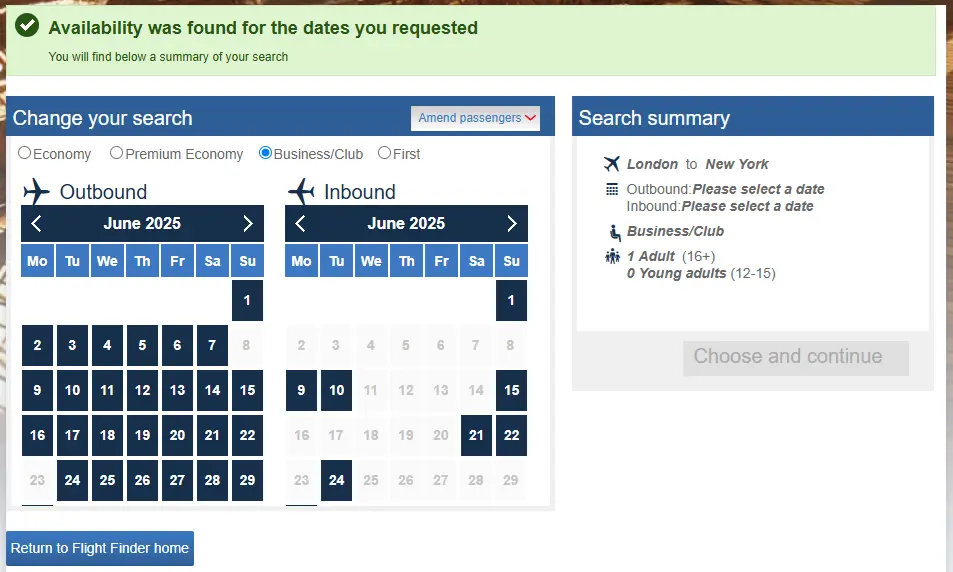
- In the BA app there’s the “Reward Flights” section, which takes you to a different “Reward Flight Finder”. This is a really quick way to see availability by date, and destination across different cabins. It does not take into account your companion voucher, but it does make it very easy to jump between cities in different regions or countries. This is useful if you want to head to a part of the World, but are open to which country or cities you end up in.
There is no perfect, single way to search for Avios availability. There are plenty of tools on the market but they lack the ability to see reward flights that appear because of a Companion Voucher. BA's tools lack the kind of features you really want, like getting flight alerts. The answer is a hybrid. If you want to stay updated on availability in the future then use a third party tool that can send you an email when it opens up. If you're focused on very specific dates on a route, the answer is to do a dummy booking, and to keep checking it. New: Using the Qantas Reward Flight Finder
In April 2026 Qantas launched a new way to search for reward seats. It is a very good way to search for Avios reward seats, with the caveat that you won’t see additional availability if you are using a companion voucher.
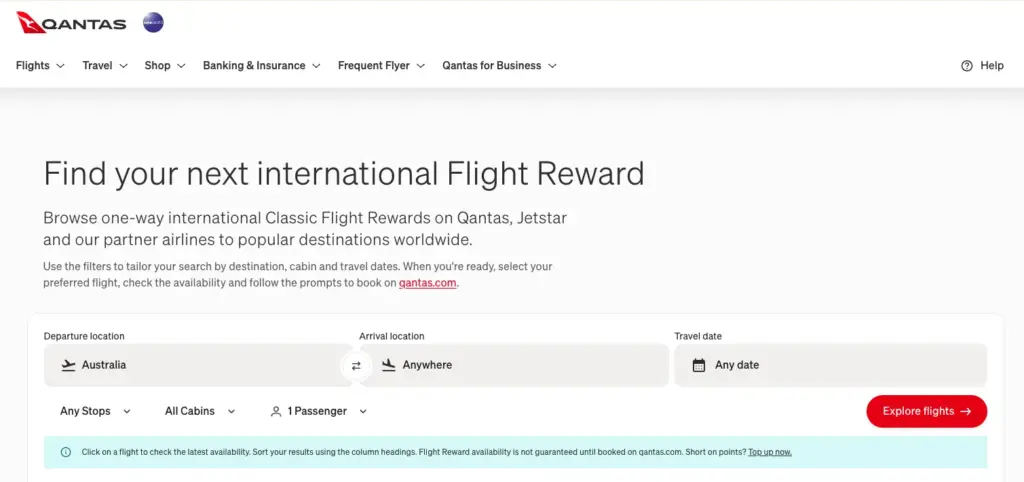
Firstly, to cover the obvious question: despite being a Qantas tool, it searches British Airways flights. It also helpfully covers Emirates flights, Finnair, Cathay Pacific, Malaysian Airlines, American Airlines and Iberia. It does not include Qatar for some reason.
Here are some of the reasons that I really like this tool:
- It’s incredibly easy to use, and the results are fast
- You can filter seats easily by cabin, from Economy, Premium Economy, Business and First
- Then you can search for a wide date range, showing availability across all the dates
- You can add multiple locations to your From or To criteria. These can be any city, not just ones that are close by or in the same country.
- You can even search for fights to “anywhere in the world” or entire countries or continents.
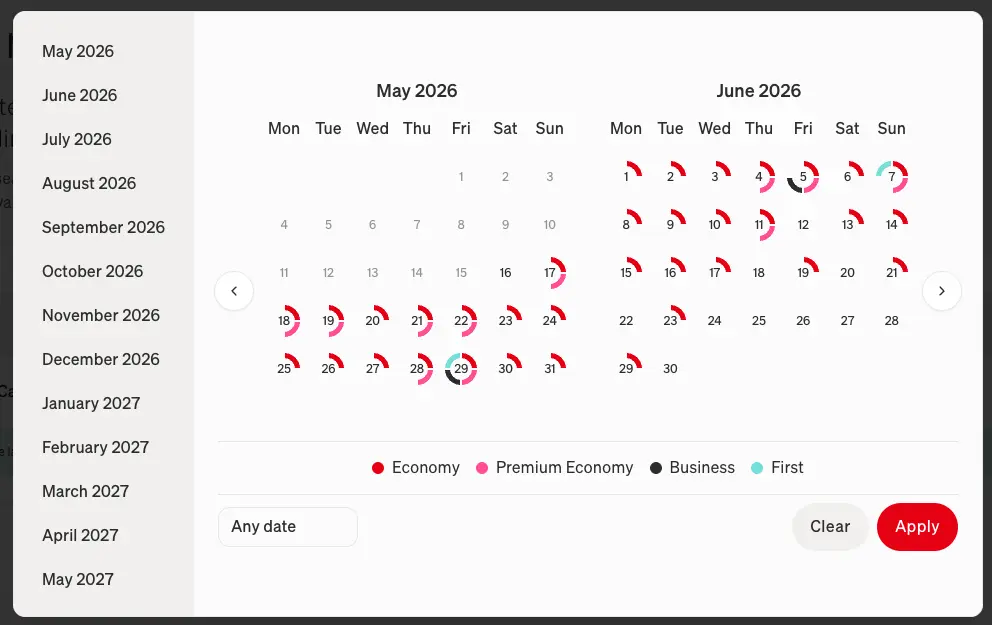
- After you have selected your To and From, clicking the date selection gives you a view of what seats are available on what dates.
There are some limitations. For example, the only city you can search for in the UK is London.
How to use the Qantas Reward Flight Finder
- Visit the Qantas Tool.
- Use the filters at the top of the page. If you want to see just the British Airways flights on a route, select Direct from the any stops dropdown.
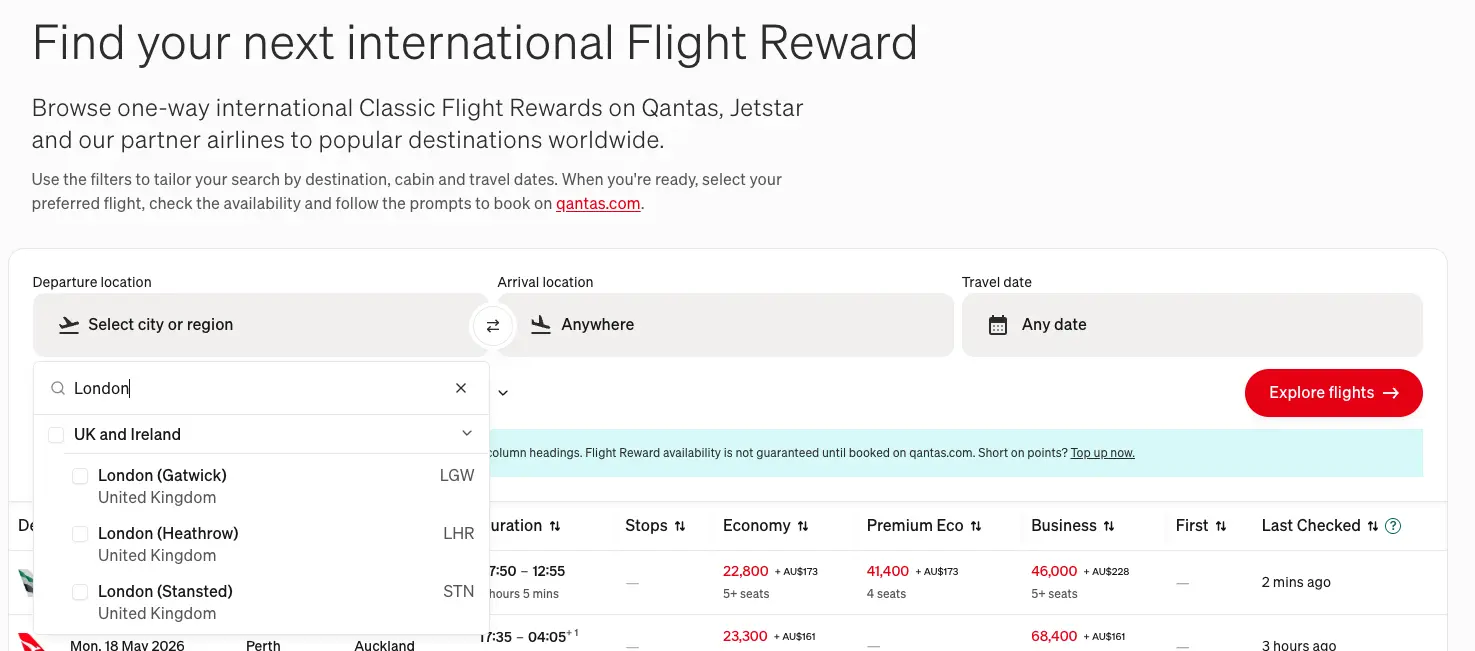
- In the results below, you’ll see the available options.
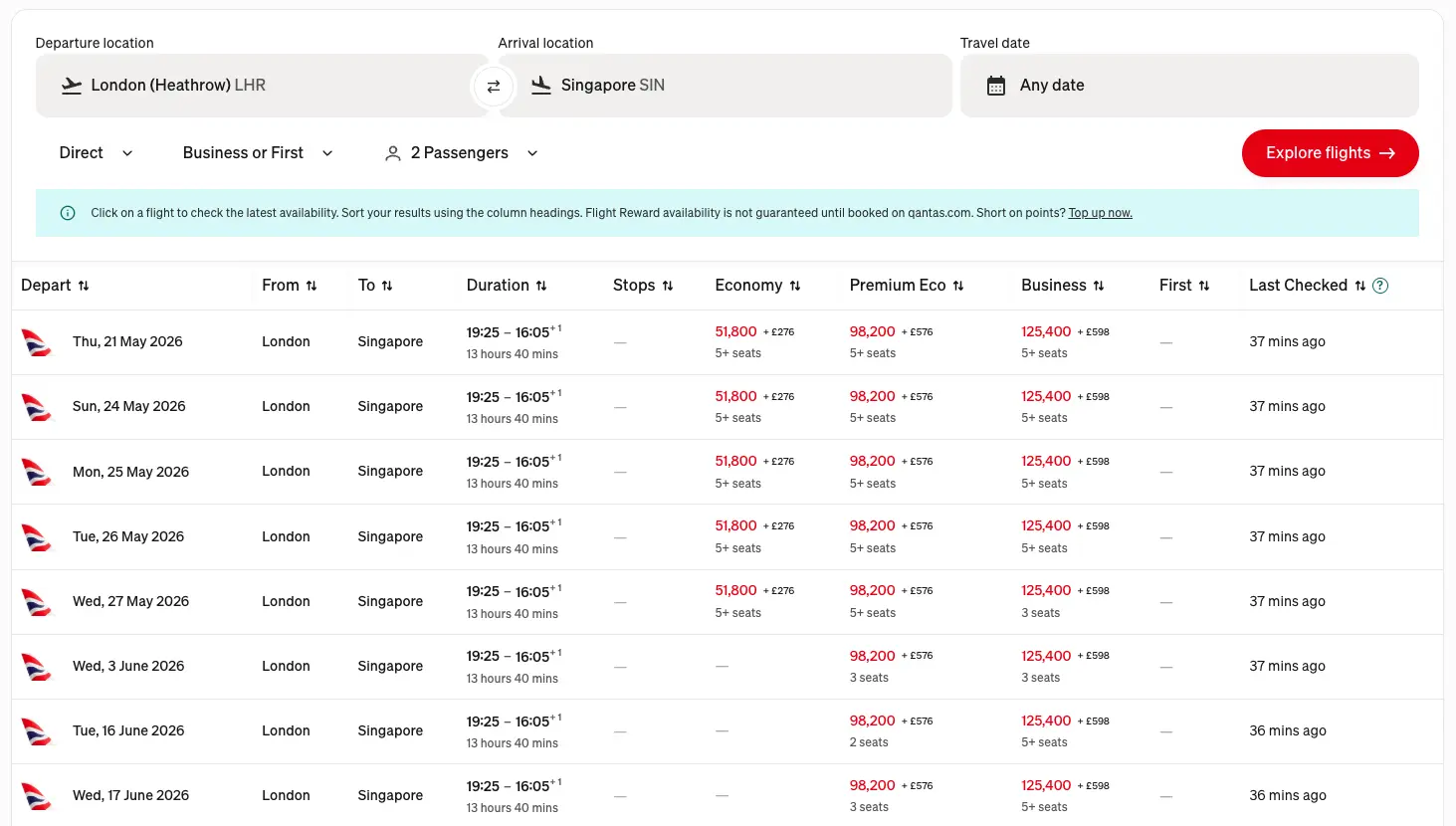
- Click the Check Availability button for it to query the flight in real-time. The data you see in the initial search results may be an hour or two delayed (you can see the actual age of the data in the Last Checked column)

When could this be useful?
This search tool is a good first step in understanding availability, but it’s unlikely that you’ll have Qantas points needed to make the booking. You cannot transfer American Express reward points to Qantas on any of the UK cards or the Currency Cards. This tool is useful for quickly and easily understanding availability, but not for making the final booking.
To actually book a flight, you’ll need to go to the British Airways site.
Here’s a good use case for it. Let’s say you want to fly to Singapore from London in Business Class, a flight that is notoriously difficult.
I can see, over the course of the next year, exactly when there are two Business seats available. Not only in the cabin I want, but also in other cabins as well. I can see how long ago Qantas checked this seat, and also the flight times. As mentioned above, you can click the “Check Availability” button and the tool will query that flight and let you know if it’s available right now.
This makes it the best, free, way to understand Avios seat availability.
Qatar’s reward flight tools
Qatar’s frequent flyer currency is Avios, and you’re able to book BA flights through them, and in reverse book Qatar flights via British Airways The latter is now more useful than ever due to the changes that Qatar made to their reward flight booking process.
There are two ways to find reward seats with Qatar:
Firstly, you can do a dummy booking. You’ll need a Qatar Privilege Club account as you have to log in to view Avios availability. The search function is, in my opinion, better than doing a dummy booking with British Airways. It’s faster, more reliable (the BA site can often throw you out and make you log in again), and it looks better.
But, and this is a bit but, you can only see availability for one seat unless you have earned at least one Avios point via a Qatar credit card, or via a cash Qatar flight. If you haven’t done that, it will block you from searching for more than one seat. This is deeply frustrating.
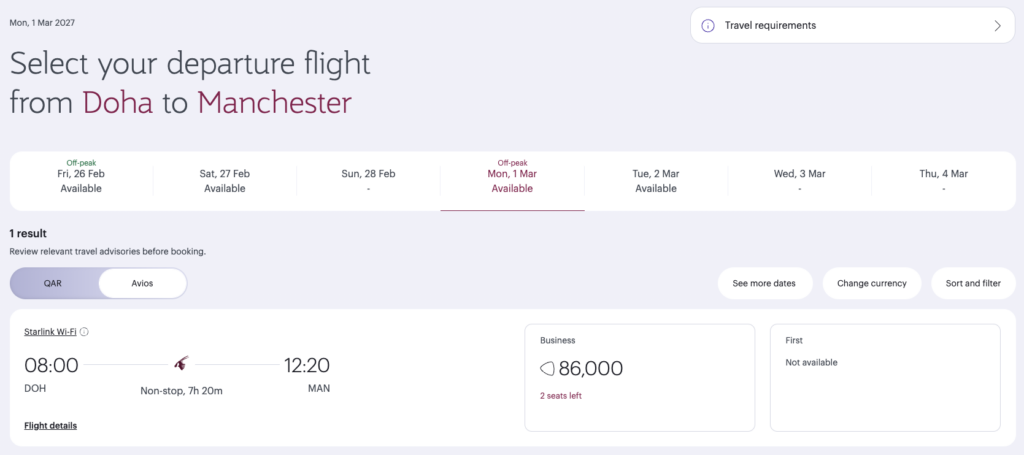
Secondly, Qatar have a reward flight finder tool. This is more flexible than doing a dummy booking. You can search for more than one seat (although unless you have satisfied the new requirements, you won’t be able to book them) and you search by month, not a specific date. This gives you a calendar view with all the available dates.
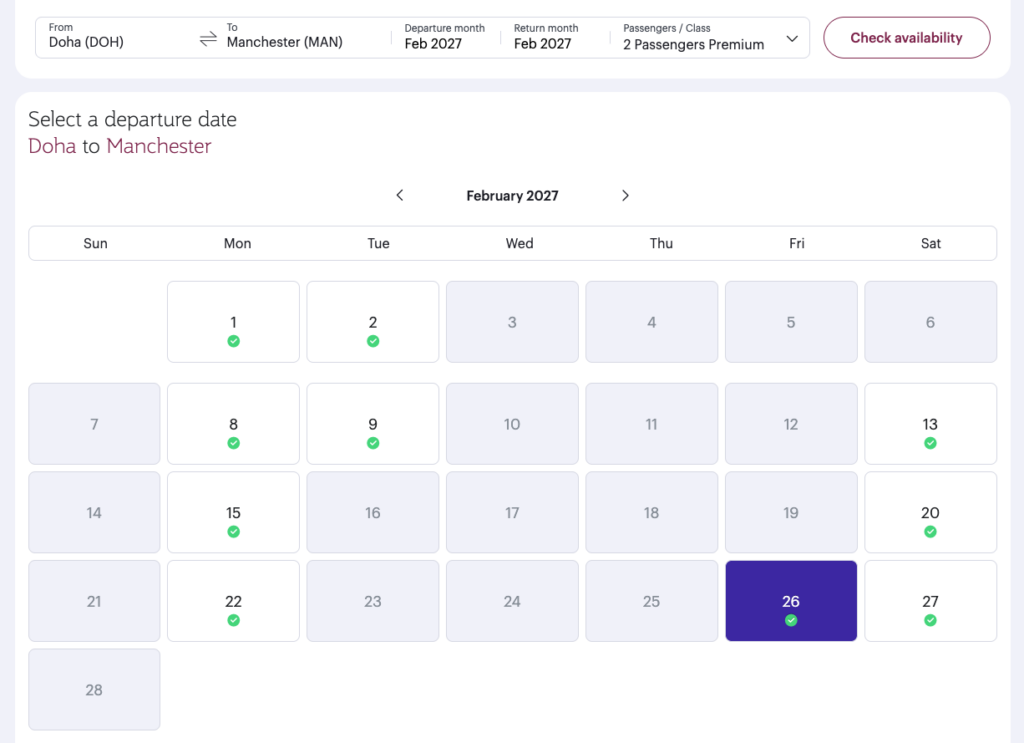
The reward flight finder tool actually allows you to get as far as the booking page. At first glance, it appears that you can book for more than one person, but once it asks you to enter the passenger details, you can only select your own name. This obviously means you can’t book for yourself and a family member.
It is, however, incredibly useful for getting around the new limitations. The challenge that we have is that both myself and my wife have a BA household account, and separate Privilege Club accounts. We could (separately) book reward seats on the same flight, but what if there is only ever one seat available? The Reward Flight Finder tool helps us see if there are actually two.
SeatSpy to find reward availability
SeatSpy is a third-party website unaffiliated with BA. They have a modern, easy-to-use interface that allows you to find Avios availability between two destinations. The results page shows you the number of seats available as well as the taxes that you would pay.
The platform takes into account peak and off-peak dates and allows you to search across all cabins (free plans allow just Economy).
SeatSpy has alert functions, where you can add routes, and it’ll notify you via email if seats become available. This is critical functionality if you’re focused on a particular destination. You need a paid plan to use the alerts. You can also get alerts sent to you via WhatsApp, Telegram and SMS on the most expensive plan.
SeatSpy has two plans: Premium for £2.99/month (£2.49 if you pay for an annual plan, which is paid in one go) and First Class, which is £7.99/month (£6.66 on the up-front annual plan).
The key difference between the paid plans is:
- Unlimited alerts on the First Class plan, four on the Premium plan
- Alerts are sent to you instantly on First Class; for Premium, they’re sent hourly
- SMS alerts are only available on the First Class plan.
- With the First Class plan, you can have email alerts sent to more than one email address.
It’s also worth noting that SeatSpy had availability data for lots of Airlines, including Virgin, Etihad, KLM, Air France and American Airlines
Expert Flyer
I have a love/hate relationship with ExpertFlyer. It’s undoubtedly the most feature-rich platform, but it’s quite a clunky and old website. At the time of writing, I can’t log in, as my account was originally set up via Facebook login and Facebook is saying that login is unavailable for the site. Their blog is currently throwing an HTTPS error as well.
There are two subscription plans: Basic at $4.99/month or Premium at either $9.99/month or $99.99 for the year. The main difference between the plans is:
- There is a limit of 250 queries per month on the Basic plan, and on Premium, it’s unlimited.
- On Premium, you also get access to Flight Availability alerts. Both plans have Seat Alerts. The difference between these functions is that Flight Availability alerts cover awards and upgrade opportunities, which is what you really want.
- Premium plans can search within a three-day (either side) window for dates.
- Premium plans also get access to features like Aircraft Change alerts.
Seats.aero
This is a search tool that I came across when trying to find availability on Qatar flights. Specifically, I wanted to set up alerts for Qatar. Seats.aero has been around since 2022, but in the last couple of years they have been expanding the site with more features and updates.
I pay $9.99 a month for their pro plan. That’s their only premium plan, although you can pay $99.99 a year on an annual plan. There is a free plan, but the main limitation on that is you can only look sixty days ahead.
It’s an expansive platform, and in some ways it’s too big. It does have excellent global coverage, with a very long list of airlines that it holds availability data on. These include British Airways, Virgin, Qatar and Aer Lingus.
I was able to set up a very specific alert: Tell me when there are Qatar business class seats from Doha to Manchester in February 2027, only on direct flights, and there had to be two seats available. One oddity on the site is that you can’t edit an alert: you have to duplicate an alert, and then change that before you save it.


2 comments
Josh
The Qantas tool actually does include Qatar, but because Qatar doesn’t release reward seats to Qantas until between 30 days (economy) and 3 days (business/first) in advance, you can only see Qatar availability within 30 days of departure.
Christine
Thanks for the great post. I was looking for something like seats.aero. It works great.