

A popular airline made an unpopular decision
Qatar tend to be the airline of positive news, which is why they didn’t even announce a change back in June that impacted every single person who wanted to make a reward booking for themselves and someone else. We only found out by accident when we tried to book a return leg from Doha. The rules meant that I could book a flight for myself, but not my wife.
What did Qatar change?
Back in June, Qatar quietly made some big changes to the way you book Avios reward seats. In simple terms, you were only able to book seats for yourself unless you added people to your “my list”.
The problem was that you could only add people to this list if you had flown a Qatar flight and paid cash for it, or if you earned at least one Avios point from a Qatar-partnered credit card. For the latter, that meant living in Qatar.
This change had a profound impact on anyone who wants to book a flight with someone other than themselves. We had booked an outbound trip to Doha, but not the return, and these rule changes made it extremely difficult to book the flight back. For most points collectors, this change will have put a stop to any reward bookings unless they were travelling solo.
There were ways around it but none were perfect. You could uproot your family and move to Qatar, then open a credit card. More realistically, you could book a short-haul flight such as Manchester to London with BA, and credit this to your Qatar account.
You could also become a Qatar Gold or Platinum level member, as they were excluded from these rule changes. Whatever you did to work around these changes, the effort felt unfair.
Why was this change made?
The official line was fraud. Qatar was losing too much due to bad actors gaining access to accounts and then booking reward flights for others. The airline can be on the hook for the points and taxes, meaning that they have to refund the original account holder.
Qatar always have a pretty strict 2FA process. Whenever I need to log in to my account via a browser, I always have to enter a code sent via SMS. Clearly, this was not enough to stop the losses.
I am not fully sold on the idea that the sole reason for the change was fraud. It felt more like a shift away from wanting Avios redemptions, in the same way that Emirates hampered points usage the previous year. However, Qatar then launched a programme of Avios discounts, and that gave a hint that points were still important to them.
What has Qatar reversed?
The change is simple, but it re-opens the door to making reward bookings for yourself and others, if not fully, then most of the way.
The rules around only being able to make reward flight bookings for yourself and those on your “my list” remain. However, they have removed the rule around only being able to add people to the list if you have either flown a cash segment or earned a point from a credit card.
This is an almost full reversal. You can now book flights for you, and your family members. You just need to make sure that anyone on that booking is listed in your Friends and Family list.
- You can add up to four people to your “my list”, meaning you can book for up to five people at once
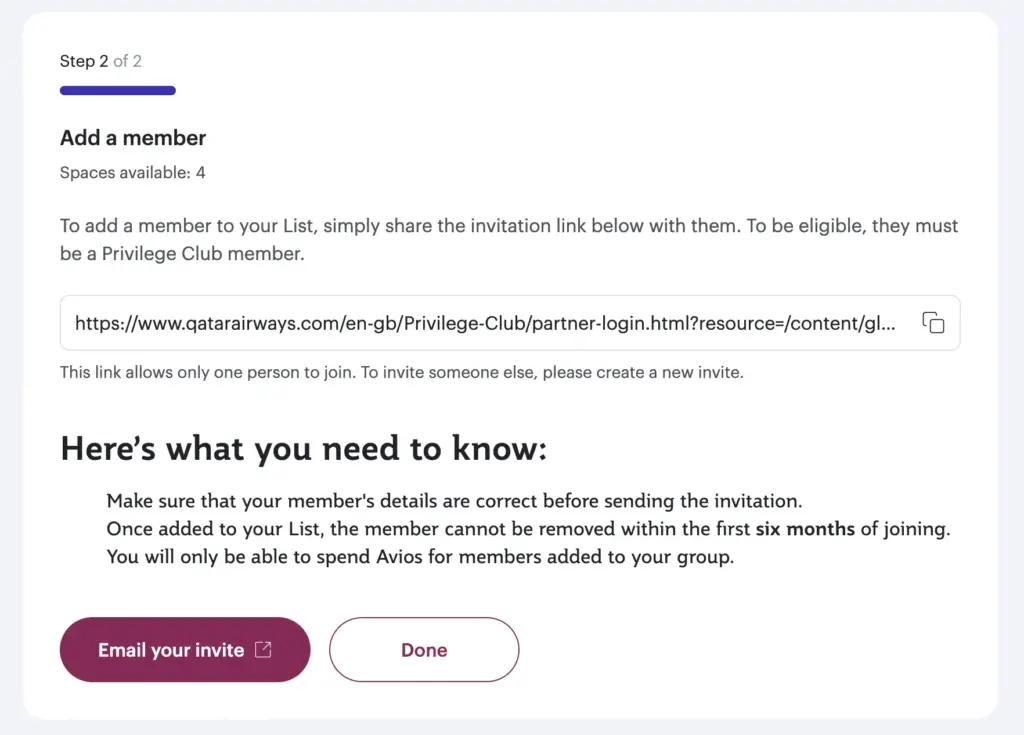
- To join your list you just need to share a link with each member
- Accounts must be at least thirty days old to be added
- You can only add individuals who are 18 years old or over
- You cannot remove added members until six months after they join your list
How do you add people to Qatar’s Friends & Family or My List?
The process is easy. Visit the My Profile page on Qatar (you will need to log in) then scroll down and click “My List”.
If you have anyone visible within your list then they will be shown here. Click the “Add New Member” button to add someone new to your list.
You then have the choice of adding someone by either sharing a link with them (in my opinion, the easiest way) or by adding their Privilege Club number.
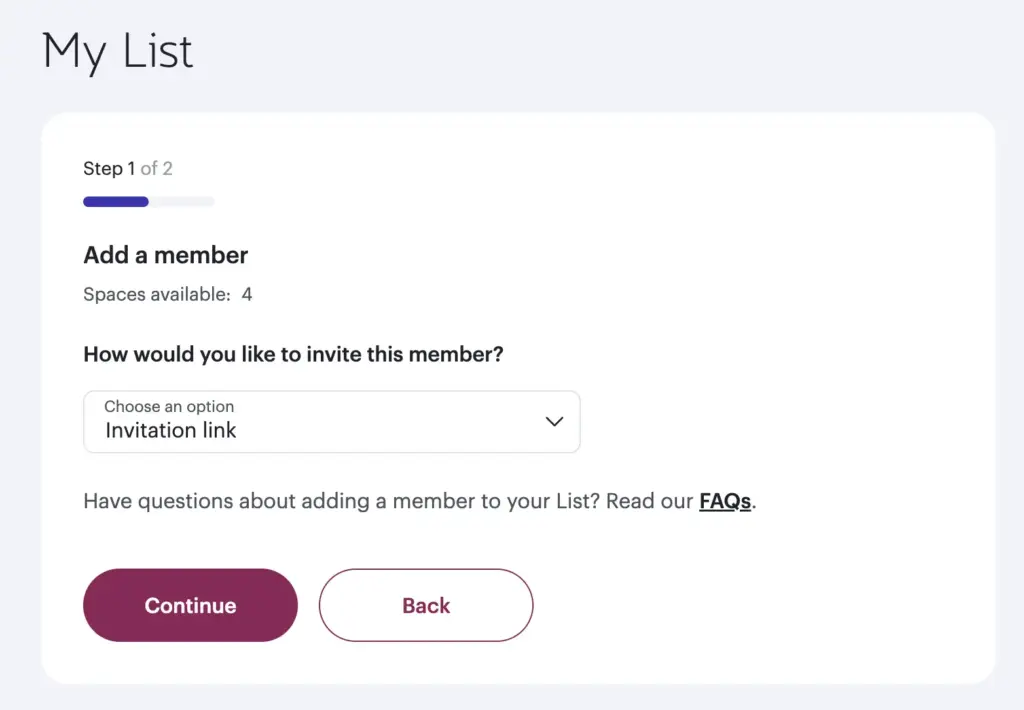
If you choose to add someone by sharing a URL with them, the next page will reveal that link to you. Drop it into an email or a message to the person you want to add.



Add a comment