

Calculating the value of Avios flights
You might just be curious, or you may want to have a long-term view of all the value you got from collecting Avios. Up to now the only way to record the value of your points was to manually store the points and value for each flight. That could have been in a spreadsheet or a document, but it was a manual (and fiddly) process
Measuring the value of your Avios on reward flights
There are ways to use your points that make it easy to understand their value: for example, with Amex Membership Rewards points, you can swap them for gift cards. You can also do something similar with Capital On Tap points. Transferring Avios to Nectar also makes it easier to understand the value. I wrote a longer article on how much an Avios point is worth that covers this.
It’s more challenging with flights. That’s because the cash value of a fare changes. Typically, if you’re using points for a reward flight in the next few weeks, then that will have a greater value than booking a year out, simply because last-minute flights usually cost more in cash.
If you really want to record the value of your reward flights, then you could use a spreadsheet. Each time you book a reward flight, look up the value of the flight as a cash fare, and then enter all the information into the sheet.
To make it even easier, I’ve built in flight tracking functionality into the Pointszilla app. You can download this on the Apple App Store for iPhone or iPad.
How do you track the value of points from your flights?
Firstly download the Pointszilla app for iOS and setup an account. It only takes thirty seconds, and you can create a username and password that allows you to store and retrieve your settings, and more importantly, any flights that you enter.
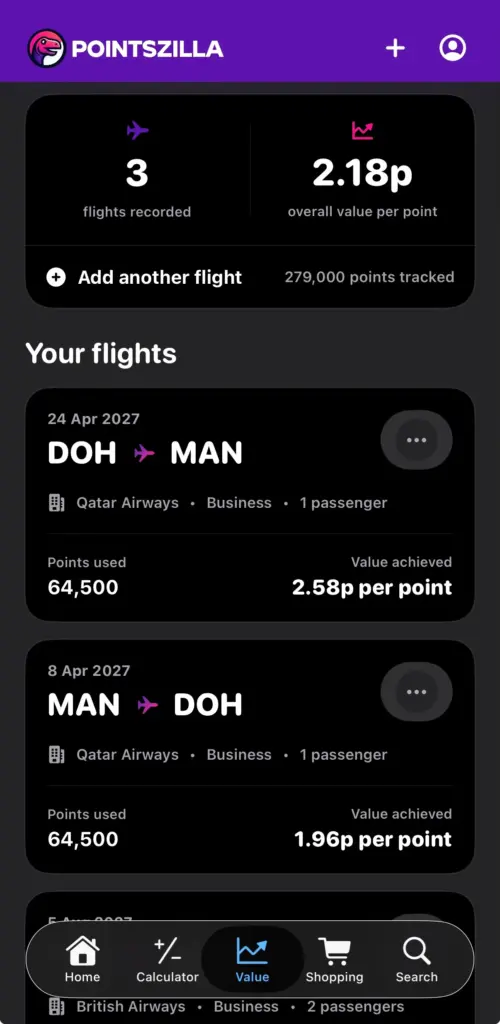
At the base of the screen tap the “Value” icon. This will take you to the “What are your points really worth?” screen, where you can store flights and see a running total of the value you got from your points.
- Click the “add flight information” button to add your first flight
- Enter the key details of your reward flight: the date, the route, cabin class and the airline.
- You can also enter how many passengers this flight was for. This is useful for breaking down some of the fixed costs like taxes and fees, on a per-person basis.
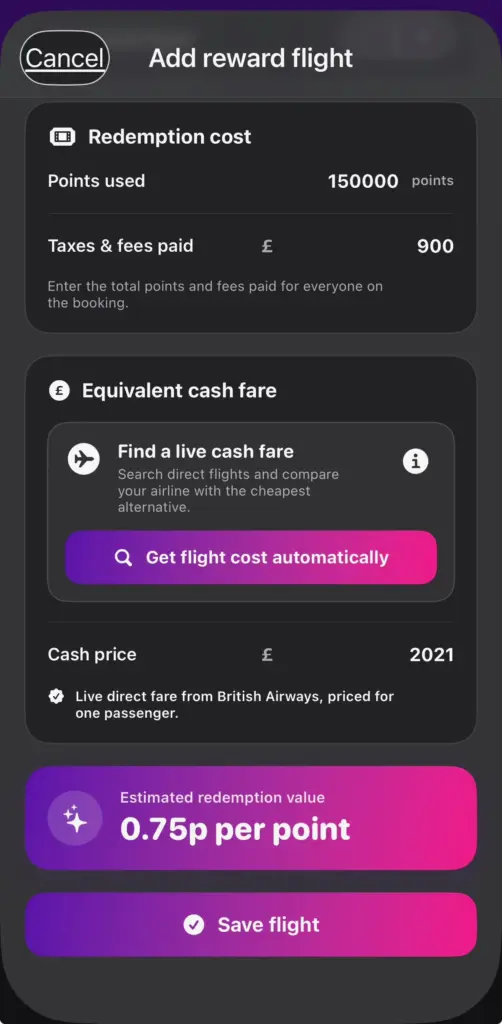
- Add in how many points you used for this flight, and the taxes and fees you paid. If this flight was for more than one person, you can choose whether the points and taxes you entered are for everyone or per person.
- This is the magical part. If your redemption is in the future, then you can tap the “get flight cost automatically” button and you can pull the flight costs directly from Google Flights. You can use costs for the same airline, alternatively use the cheapest direct flight costs, and even use a “representative return” cost. The latter allows you to use half of the cost of a return flight, rather than a one-way flight (which will usually be significantly more expensive).
- Tap Save Flight and this flight will be recorded permanently. You can edit or delete any flights that you have added.
Every time you add a reward flight, it will appear in the list, and your running total of points value will be updated.
Is there a cost for this and the Pointszilla app?
The app, like our website, is completely free and carries no advertising. We’re passionate about travel, and we really enjoy creating content (and the app itself). Ads are distracting and take away from the whole experience.

Add a comment